
This post is the follow up I promised at the end of Wolverine's Agent Assignment at Scale, where the warm-up node role was still a preview. It shipped in Wolverine 6.51 last week.
A JasperFx client runs a very large event sourced system on the Critter Stack. Lots of tenants, lots of events, and a couple dozen asynchronous projections that the business actually depends on. The hard part is that the system is also frequently evolving and that's frequently led them to needing to rebuild some projections that themselves need to be revised as part of the deployment.
The ability to "just" rebuild projections from the raw system of record events is of course one of the core selling points of event sourcing. Except that rebuilding one of those projections from scratch takes hours, and nobody wants their users looking at a half built read model while that happens. What this client needed, in their own words, was for the new projection versions to be mostly caught up before anybody switches traffic over to the new release. That's a blue/green deployment, but with a twist that turns out to matter a great deal: the "green" side (the new version of the application) has to be part of the running cluster long before it's allowed to actually do anything.
I've written about the Critter Stack's blue/green support a few times over on my personal blog, starting with Scaling Event Projections and Subscriptions with the Critter Stack when Wolverine first learned to distribute projection work, then Projections, Consistency Models, and Zero Downtime Deployments with the Critter Stack, which is still the best explanation of the Marten side. This post is about what was missing from that story, and what we built to close the gap. There are four pieces, and they only really work together:
- Versioned projections in Marten and Polecat, so two versions of the same projection can coexist in the database
- Capability-based agent assignment in Wolverine, so the new version only ever runs on the nodes that have it
- Warm-up nodes, new in Wolverine 6.51, so those nodes can rebuild the new version without doing anything else
- The side-effect gate in Marten and Polecat, so catching up over history doesn't replay every side effect your old version already fired
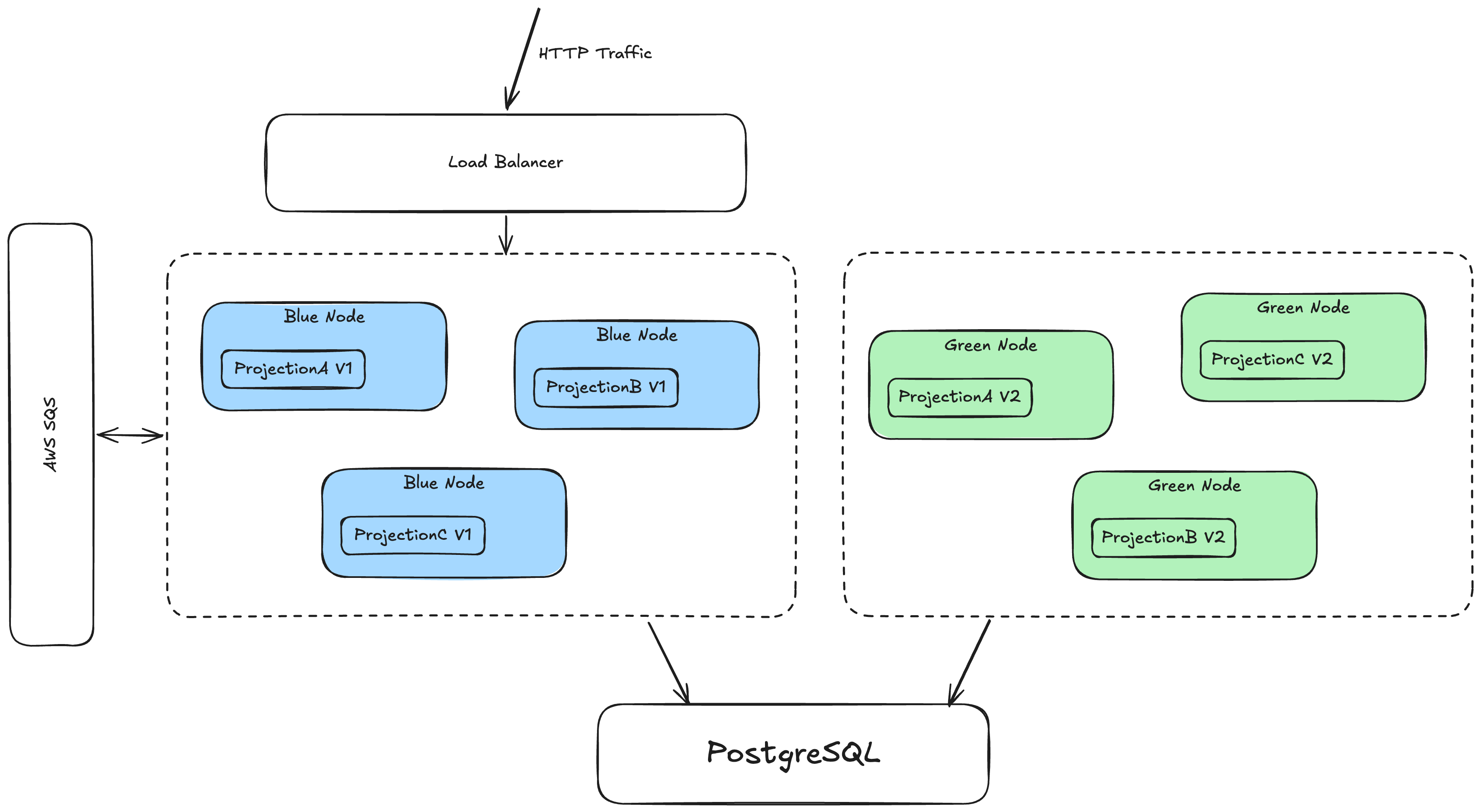
The shape of it: the load balancer and the message queue only know about blue. Green is a member of the same cluster, shares the same database, and runs nothing but the new projection versions until it's told otherwise.
Versioned Projections in Marten and Polecat
Let's start with the piece that's been around the longest. A projection in Marten is derived data, and when its shape or its logic changes, the honest thing to do is rebuild it from the event history. The problem is purely operational: while that rebuild is running, the old table is either empty or half right, and your users are looking at it.
Marten's answer is to let two versions of the same projection live side by side. Bump the Version on the projection, and Marten treats it as a brand new projection with its own storage and its own progress tracking:
public class TripProjection : SingleStreamProjection<Trip, Guid>
{
    public TripProjection()
    {
        // This is the magic sauce. V2 gets its own tables and its own
        // progress, completely separate from V1
        Version = 2;
    }

    // Apply() methods as usual...
}
Register the new version with the Async lifecycle, even if the old one was Inline, so it can catch up in the background instead of blocking every command that touches the stream. And because FetchForWriting() gives your command handlers strong consistency regardless of the projection's lifecycle, the write side keeps working against the new version while it's still behind. It might be a little slower while the daemon catches up, but "slower" is a lot better than "down."
The Marten docs cover this under Blue/Green Deployments with Projection Versioning, and the same mechanism is in Polecat because both are built on the same JasperFx.Events projection and daemon engine. Everything in this post applies to both; I'll say "Marten" from here on because that's what this particular client runs, but if you're on SQL Server with Polecat, just mentally swap the name.
Housekeeping is still on you, by the way. Once the old version is retired, nothing in Marten drops its tables for you. That's a DROP TABLE in a migration after the dust settles.
Wolverine Assigns Projection Agents by Capability
Versioned projections get you two versions in the database. They don't get you two versions running in the right places across a cluster, and that's where Wolverine comes in. I went deep on this in the agent assignment post, so here's the short version.
When you opt into Wolverine managing your projection and subscription work:
opts.Services.AddMarten(m =>
    {
        m.Connection(connectionString);
        m.Projections.Add<TripProjection>(ProjectionLifecycle.Async);
    })
    .IntegrateWithWolverine(m =>
    {
        // Wolverine spreads every async projection and subscription
        // across the cluster, each running on exactly one node
        m.UseWolverineManagedEventSubscriptionDistribution = true;
    });
every async projection shard becomes an agent with a Uri that includes its version, and every node in the cluster heartbeats the set of agent Uris it knows how to run into the wolverine_nodes table as its capabilities. One node is elected the leader, and the leader hands each agent to exactly one node, but only ever to a node that declares the capability to run it.
That rule is the whole trick. Deploy a release that bumps TripProjection to V2, and the new nodes advertise Trip:V2 while the old nodes still advertise Trip:V1. The leader assigns V1 agents to blue, V2 agents to green, and never crosses the streams. Both versions follow the same event stream, write to their own tables, and nobody has to coordinate anything by hand. As that previous post went into at length, there's a lot of hard won work behind the scenes to make that mixed-version fleet stable when the agent count has five digits, but from the outside it's still that one line of configuration.
So far, so good, and this is where the story stood in March of last year. And this is also exactly where the client ran into trouble.
Warm-up Nodes
Here's the catch. For a green node to be assigned the V2 agents at all, it has to be a member of the Wolverine cluster. But a normal member of the cluster does a lot more than run projection agents. It listens to every configured transport endpoint and handles whatever shows up. It recovers persisted envelopes from the inbox and outbox. It polls for scheduled messages and runs recurring schedules. It runs event subscriptions. And it does all of that with the new code.
Think about what that means in a release that also introduces a new event type. Green picks up a command off a queue, handles it with the new code, and appends an event blue has never heard of. What happens next depends on how you've configured the daemon. With Marten's default SkipUnknownEvents setting, blue's projections quietly skip the event and your read models on blue are now subtly wrong. And if you've turned that setting off, because silently skipping events is its own kind of scary, every async projection on blue that reads that stream stops dead with an UnknownEventTypeException. Ask us how we know.
Even without a new event type, you don't want green doing real work yet. The whole point of the exercise was to have the new projection versions caught up before the new release starts serving. If green is already handling messages, you've cut over by accident, with a half built read model.
What the client needed, and what Wolverine 6.51 adds, is a node that joins the cluster for the sole purpose of warming up projections and does nothing else:
using var host = await Host.CreateDefaultBuilder()
    .UseWolverine(opts =>
    {
        // Only on the green nodes, and only until you cut over to them.
        // Default is NodeRole.Serving
        opts.Durability.NodeRole = NodeRole.Warmup;
    }).StartAsync();
In practice you'd drive that from configuration so the cut over is a config change and a restart rather than a new build:
opts.Durability.NodeRole = builder.Configuration
    .GetValue("WOLVERINE_NODE_ROLE", NodeRole.Serving);
A warm-up node takes part in the agent cluster through its control queue, and otherwise stays out of the way:
- It never becomes the leader. A green node's own store enumerates the new version's agents, which makes it the least representative node in the cluster to be making assignment decisions for everybody else.
NodeRole.Warmupimplies theLeadershipEligible = falsesetting that was added in 6.49 for exactly that reason. - It is only ever assigned the projection agents that no serving node declares. That's the V2 agents and nothing else. The projections that didn't change in this release stay put on blue, so green joining or leaving the cluster doesn't reshuffle anything that was already running.
- It never runs event subscriptions. A subscription is a side effect by definition, and blue keeps running all of them until the cut over.
- It runs its projection agents in the daemon's rebuild mode. That means
RaiseSideEffects()never fires and nothing gets published out of those projections while they catch up. Unlike a real rebuild though, the agent keeps following the live event stream, and a restarted warm-up node resumes from its own committed progress rather than starting from zero. That part needed a new execution mode in the shared JasperFx daemon that Marten, Polecat, and Fisher all build on. - It listens to its own control endpoint and nothing else. No application listeners, no inbox or outbox recovery, no durability agents, no polling for scheduled messages, no recurring schedules, no exclusive or leader-pinned listeners.
Nothing about this needs a schema change. The role travels to the leader as a marker in the node's capabilities, the same list that already carries the projection versions, so the leader just sees one more thing green can "do."
Cutting over
When the V2 projections are caught up, or caught up enough for your taste, restart the green nodes as NodeRole.Serving and move them into the load balancer. The V2 agents carry on in normal continuous mode from the same progress they'd reached, side effects and all, and from that point regular blue/green assignment takes it from there. Take the blue nodes down whenever you're ready, and the leader (now one of the green nodes) reassigns whatever was left on them.
A couple of safety properties fell out of the design that I'm quite happy with. If every serving node disappears while green is still warming up, nothing gets reassigned at all. A warm-up node never leads, so there's no leader to do the assignment, and green keeps running exactly what it was running. That's deliberate. A crash in the middle of a warm-up should never quietly turn the new release into production. And if a warm-up shard gets paused on something transient, like the connection pool running dry halfway through a big replay, Wolverine 6.51's self-healing restart brings it back in rebuild mode from its committed progress rather than starting the replay over.
One ordering requirement: upgrade your serving nodes to a Wolverine version that understands node roles before you roll out your first warm-up node. The leader is always one of the serving nodes, and an older leader will simply ignore the marker and assign agents to green the way it always has.
What Wolverine can't turn off for you
Wolverine can only enforce the role inside its own runtime. The rest of your application is still running on a warm-up node, so the docs carry a checklist, and it's worth walking through:
Your own hosted services. Any
BackgroundServiceorIHostedServicethat polls for work, a file importer say, will happily run on green. Check the role and bail out early:csharppublic class FileImportPoller(IWolverineRuntime runtime) : BackgroundService { protected override async Task ExecuteAsync(CancellationToken stoppingToken) { if (runtime.Options.Durability.NodeRole == NodeRole.Warmup) return; // poll for files... } }HTTP traffic. Keep the green pods out of your load balancer, meaning the Kubernetes
Serviceselector or its equivalent, until you cut over. Your health check endpoints still need to answer of course.Calling
IMessageBus.InvokeAsync()from your own code. That runs the handler inline on whatever node calls it, warm-up node or not.Inline side effects in an
Apply()method. Rebuild mode stopsRaiseSideEffects(), but anything your projection code does directly insideApply()runs regardless of the mode. Which is one more reason not to do that.
Also, we strongly recommend against doing any kind of side effects in a projection other than in the formal RaiseSideEffects() method.
Side Effects and the Gate Behind the Prior Version
There's a related problem on the Marten side of the fence that this same client hit, and it deserves its own section because it bites even if you never use a warm-up node.
Some projections raise side effects: they append new events or publish messages through RaiseSideEffects() as they process. Now bump that projection from V2 to V3. The new version starts with no progress of its own, so as an Async projection it catches up over the entire event history, including every event V2 already processed and already fired side effects for. Without a guard, deploying V3 re-emits every one of those side effects. Depending on what the side effects are, that ranges from embarrassing to genuinely bad.
Marten 9.39.1 added an opt-in gate for exactly this:
public class TripProjection : SingleStreamProjection<Trip, Guid>
{
    public TripProjection()
    {
        Version = 3;

        // Only fire side effects for events the prior version (V2) never processed
        GateSideEffectsBehindPriorVersion = true;
    }

    // Apply(...) methods and RaiseSideEffects(...) as usual
}
With the gate on, a new version that starts behind the highest prior version's persisted progress mark, call it N, catches up in two phases. First it replays everything up to N in rebuild mode, so RaiseSideEffects() is suppressed while the V3 documents are brought up to the point V2 had already reached. Then it hands off to normal continuous execution from N, so side effects fire only for events past N, the ones V2 never saw. If the warm-up is interrupted partway through, the next start resumes the suppressed replay from where it left off rather than starting over, and if the replay throws, the shard stays paused and continuous mode never starts, so no side effects leak out over history the prior version already covered.
The full behavioral notes, including the one overlap window the gate deliberately accepts if you leave the old version running past N, are in the Marten docs.
So how does this relate to warm-up nodes? A warm-up node already runs its agents in rebuild mode, so it never fires a side effect, and when it flips to serving it continues from the same progress. If every rollout goes through a warm-up node, the gate is belt and suspenders. But not every rollout does. Plenty of teams run plain blue/green where green is a normal serving node from the start, and plenty more use Marten's own daemon without Wolverine managing it at all. The gate is the answer that lives inside the daemon itself, so it works in all of those cases, and it's cheap enough that I'd turn it on for any versioned projection that raises side effects and never think about it again.
Putting It Together
Here's the rollout as it looks for that client now, start to finish:
- Bump
Versionon the projections that changed. Flip onGateSideEffectsBehindPriorVersionfor any of them that raise side effects. Make sure the new versions are registered asAsync. - Deploy the new release as green nodes with
NodeRole = Warmup, outside the load balancer. The leader on blue sees the new capabilities and assigns the V2 agents to green, and only to green. Blue carries on serving traffic, running the V1 agents, all the unchanged projections, and every subscription, exactly as before. - Wait. The V2 agents replay history in rebuild mode and keep following the live stream once they catch up. Progress is visible per shard in CritterWatch, and at the very least in the projection progress table, so you know when "mostly caught up" has arrived.
- Flip green to
NodeRole = Servingand move it into the load balancer. The V2 agents continue from the same progress in continuous mode. Green now handles messages, subscriptions, and everything else. - Retire blue. Its agents get reassigned to green by the new leader.
- Drop the V1 tables in a later migration.
No downtime, no half built read models in front of users, no accidental cut over, and no replayed side effects. The part I like most is how little of it is visible from application code. The projection class gained a version number. The deployment gained one environment variable. Everything else is the leader doing its job.
How JasperFx Can Help
The warm-up node role, the side-effect gate, and most of the agent assignment hardening it sits on all came directly out of JasperFx client engagements with teams running the Critter Stack hard enough to find the edges. This is what a JasperFx support contract looks like at its best: a production system that teaches us things we couldn't learn any other way, and fixes that go straight back into the open source tools for everybody. If you're staring down a projection rollout on a big system and would rather not learn about UnknownEventTypeException the way we did, we'd love to talk, and the Critter Stack Discord is always open for talking shop.
Wrapping Up
Blue/green deployment of projections has been possible with the Critter Stack for a couple of years, but "possible" was carrying a lot of weight. The new nodes had to join the cluster to get their agents, and joining the cluster meant doing real work with new code before anybody intended them to. Wolverine 6.51's warm-up role closes that gap: a green node can now be a full member of the cluster whose only job is to catch up the new projection versions, and the cut over is a configuration flip. Combined with Marten's versioned projections, capability-based agent assignment, and the new side-effect gate, that's the complete story for evolving a big event sourced system's read models without ever putting up a "service unavailable" sign. The docs are at Warming Up a New Release on Its Own Nodes, with the Polecat equivalent right next to it.