
JasperFx's goal is to make the Critter Stack the very best technical solution for server side development in .NET, and cron jobs were something that we'd been missing outside of "I dunno, just use Quartz to delegate to Wolverine?"
Many systems have some kind of work that just needs to happen on a schedule. Nightly rollups, a sweep every few minutes to find stuck work, polling a partner's feed, cleaning up stale data, the "fleet health check" that pages somebody when it finds something wrong. For most of my career the answer in .NET was either a Windows service with a Timer, a BackgroundService with a while loop and a Task.Delay(), or pulling in Quartz.NET or Hangfire and living with a second scheduling framework next to your messaging framework.
None of those are terrible, but they all leave you doing a lot of work yourself that you've probably already paid for somewhere else in the system. If the job fails, who retries it? If it throws, where does the failure go? Does it run once per cluster, or once per node? Can an operator see whether it actually ran last night, and can they pause it during an incident without a deploy? Can your tracing tool connect the three downstream messages to the cron tick that caused them?
Since Wolverine 6.34, a recurring job is just a Wolverine message published on a cron schedule. Let's look at that new functionality within Wolverine, then we'll look at how CritterWatch 1.2 lets you manage those schedules across an entire fleet of services, including from an AI agent over MCP.
It's just a message
Here's the simplest possible registration, taken straight from TripService in the sample fleet we use to test CritterWatch:
// Registration IS the opt-in. There is no separate feature flag
opts.Schedules.ScheduleRecurring<FleetHealthSweep>("* * * * *");
And the handler, which is deliberately boring because the point of this sample is the schedule rather than the work:
public static class FleetHealthSweepHandler
{
    public static async Task Handle(FleetHealthSweep _, IQuerySession session, ILogger logger)
    {
        var activeTrips = await session.Query<Trip>().CountAsync(x => x.Active);

        logger.LogInformation(
            "Fleet health sweep at {Timestamp:O}: {ActiveTrips} active trip(s)",
            DateTimeOffset.UtcNow, activeTrips);
    }
}
That's it. FleetHealthSweep is an ordinary message with an ordinary handler. The only new thing is the one line that says when Wolverine should publish it. Every occurrence goes through the exact same pipeline as any other message in your system, which means you get all of this without writing a line of code for it:
- OpenTelemetry tracing and metrics. Each firing is its own trace, rooted in a
wolverine.recurring.occurrencespan, and the handler's activity is tagged with the schedule's name and the exact occurrence it's serving. If the sweep publishes three more messages, your tracing backend (Jaeger, Application Insights, whatever you use) shows all of them hanging off the cron tick that caused them. The schedule name is also a metrics tag, so you can slice success and failure rates per schedule in Grafana. - Error handling and retries. Retries, exponential backoff, circuit breakers, "pause the listener if this keeps failing." All of Wolverine's resiliency policies apply to a scheduled occurrence exactly as they do to a message off RabbitMQ.
- Dead letter storage. A job that fails for good lands in the dead letter queue with its exception, where you can replay it later instead of hunting through logs.
- The transactional outbox and inbox. Anything the handler writes and any messages it publishes are committed together. The job's side effects don't half-happen.
- Middleware, validation, multi-tenancy, logical deduplication. Whatever you've configured for your handlers applies here too.
- Testability. It's a message with a handler. You test it the same way you test every other handler, and you can publish one by hand in a test without waiting on a clock.
That last point is bigger than it sounds. With Quartz or Hangfire you end up building a little job class that exists to call into your real code, and all the cross-cutting concerns you've built for messaging don't apply to it. With Wolverine the job is the message, so there's nothing to bridge.
Once per cluster, and the chain that doesn't break
Two things I want to call out because they're the reasons we built this at all rather than telling people to use a hosted service.
First, a recurring schedule fires once per cluster, not once per node. Wolverine runs the scheduling on an agent that lives on exactly one node at a time and moves on failover, and every occurrence carries a deterministic deduplication id built from the schedule name and the occurrence time. If an agent moves between nodes in the middle of a tick, or a rolling deploy briefly has two versions of the service running, the duplicate collapses to one handling. A BackgroundService with a timer runs on every node you scale out to, and most teams discover that the hard way.
Second, there's a pattern we see a lot in Wolverine systems that this replaces: the handler that reschedules itself. "Handle CheckForStuckOrders, then return a delayed copy of CheckForStuckOrders for ten minutes from now." It works right up until one link is lost, dead-lettered or discarded in a redeploy, and then the job silently stops forever. Usually somebody notices weeks later. A recurring schedule is owned by an agent that recomputes the next occurrence from the cron expression, so a missed firing is a missed firing and nothing more. The failure semantics are deliberate and worth reading, but the short version is that the schedule itself can't die.
Give the message the occurrence time
The ScheduleRecurring<T> overload above constructs a new FleetHealthSweep per occurrence, which is why it needs a public no-argument constructor. The overload I'd actually reach for most of the time takes a factory that's handed the occurrence time, so the message can describe the window it covers. Here are three more schedules from the TeleHealthService in the same fleet:
// Daily, 7 AM in Chicago, with an explicit time zone
opts.Schedules.ScheduleRecurring(nameof(ClinicDayRollup), "0 7 * * *",
    _ => new ClinicDayRollup(), TimeZoneInfo.FindSystemTimeZoneById("America/Chicago"));

// Every minute, and the message carries the instant it was due
opts.Schedules.ScheduleRecurring(nameof(PayerFeedCheck), "* * * * *",
    occurrence => new PayerFeedCheck(occurrence));

opts.Schedules.ScheduleRecurring(nameof(RoomCheckSweep), "* * * * *",
    occurrence => new RoomCheckSweep(occurrence));
A parameterless message has to infer "what period am I covering?" from DateTimeOffset.UtcNow at handling time, and that's subtly wrong under a retry, a late-running agent, or a manual trigger. The occurrence time is the honest input. RoomCheckSweep records it on every event it appends:
public record RoomCheckSweep(DateTimeOffset Occurrence);

public static class RoomCheckSweepHandler
{
    public static async Task Handle(RoomCheckSweep sweep, IDocumentStore store, CancellationToken cancellation)
    {
        await using var session = store.LightweightSession(Tenant);

        foreach (var (room, streamId) in Rooms)
        {
            var check = new RoomChecked(room, sweep.Occurrence);

            if (await session.Events.FetchStreamStateAsync(streamId, cancellation) is null)
            {
                session.Events.StartStream<RoomCheckLog>(streamId, check);
            }
            else
            {
                session.Events.Append(streamId, check);
            }
        }

        await session.SaveChangesAsync(cancellation);
    }
}
One thing to know: the schedule's name is an identity, not a label. It's what the deduplication id, the telemetry tag and every CritterWatch action key on, so two schedules can't share one. The single-type overload defaults the name to the message type's name, which means two schedules of the same message type on different crons will collide at startup. Give them explicit names through the factory overload and you're fine.
Cron expressions are the standard five fields, or six with leading seconds, parsed by Cronos, with daylight saving transitions handled correctly. A bad expression throws at the registration line, which is exactly where you want a programming error to show up.
A nightly job and a five second job are not the same problem
This is the part I most want people to understand, because it's where the design changed between the first release and today.
When recurring messages shipped in 6.34, every schedule worked one way: a single agent in the cluster kept the next occurrence of each schedule pre-scheduled as an ordinary scheduled message in the durable inbox, and it fired when the scheduled job poller next looked, which is every five seconds by default. For a nightly rollup or an hourly report that's the right shape. The next occurrence is sitting in your database as a real row, it survives a crash, it fires even while the agent is moving between nodes, and five seconds of latency on a 2 AM job doesn't matter to anyone.
It's the wrong shape for a schedule with a short gap between occurrences. If a job runs every ten seconds, the poller interval is now half the cadence, every occurrence costs an inbox row, a tracking row write and a deduplication row, and you're paying that thousands of times a day for work whose whole point is to be cheap and frequent.
So since Wolverine 6.52, the length of the gap between occurrences decides how a schedule runs. There are two execution paths and Wolverine picks between them per schedule:
| Scheduled message path | Timer agent path | |
|---|---|---|
| Which schedules | shortest gap between two occurrences is 15 minutes or more | shortest gap is under 15 minutes |
| Who publishes | one singular agent for the whole service | one agent per schedule, spread across the cluster |
| How an occurrence fires | pre-scheduled envelope in the durable inbox, fired by the poller | in-memory timer, published the moment it comes due |
| Latency | up to one poller interval after the cron instant | effectively none |
| Cost per occurrence | inbox row, tracking row write, dedup row | dedup row only |
| Visible on the Scheduled Messages page | yes, as the pending next occurrence | no, there's no inbox row |
| If the owning node dies | the pre-scheduled occurrence still fires | occurrences in the failover window are lost |
Note that it's the shortest gap over a week, not the first gap, so */5 9-17 * * 1-5 counts as a five minute schedule even though there's a long gap overnight. The threshold is opts.Schedules.TimerThreshold, and any schedule can force either path:
// Anything under this runs on a timer agent automatically. 15 minutes is the default
opts.Schedules.TimerThreshold = TimeSpan.FromMinutes(15);

// A daily schedule that should still fire the moment it comes due
opts.Schedules.ScheduleRecurring("daily-timer", "0 9 * * *", _ => new TimerTickMessage())
    .UseTimer();

// A fast schedule that should stay on the scheduled-message path
opts.Schedules.ScheduleRecurring("fast-scheduled", "*/30 * * * * *", _ => new TimerTickMessage())
    .UseScheduledMessages();
Nothing changes for your handler on either path. Same headers, same span, same deduplication id, so a rolling deploy where old nodes are still pre-scheduling and new nodes are on timers still collapses to one handling per occurrence. What changes is the operational picture, and that last row in the table is the one real difference in failure semantics: a timer schedule has nothing queued, so a restarted agent starts with the first occurrence after "now." For a five second sweep that's a handful of lost ticks and you should design the handler so that a gap is harmless. For a nightly job you'd rather have the envelope sitting in the inbox, and that's exactly what you get.
Wolverine 6.61 took the timer path all the way down to every second (* * * * * *), and added SkipWhileRunning() for the fast-schedule-calling-something-slow case, where a tick that comes due while the previous one is still being handled is skipped rather than piled on:
opts.Schedules.ScheduleRecurring("poll-inventory", "* * * * * *",
        occurrence => new PollInventory(occurrence))
    .SkipWhileRunning();
wolverine describe prints which path each schedule landed on, and so does CritterWatch, which is where we're going next. The full writeup of both paths is in the recurring messages documentation.
Seeing and managing every schedule in CritterWatch
Here's the thing about cron jobs in production: the question is never "did I write the cron expression right?" It's "did it run last night, did it fail, and can I stop it right now without a deploy?" CritterWatch 1.1 added the Schedule Explorer, and 1.2 made it answer those questions. Here it is against the sample fleet, with the schedules from the code above:
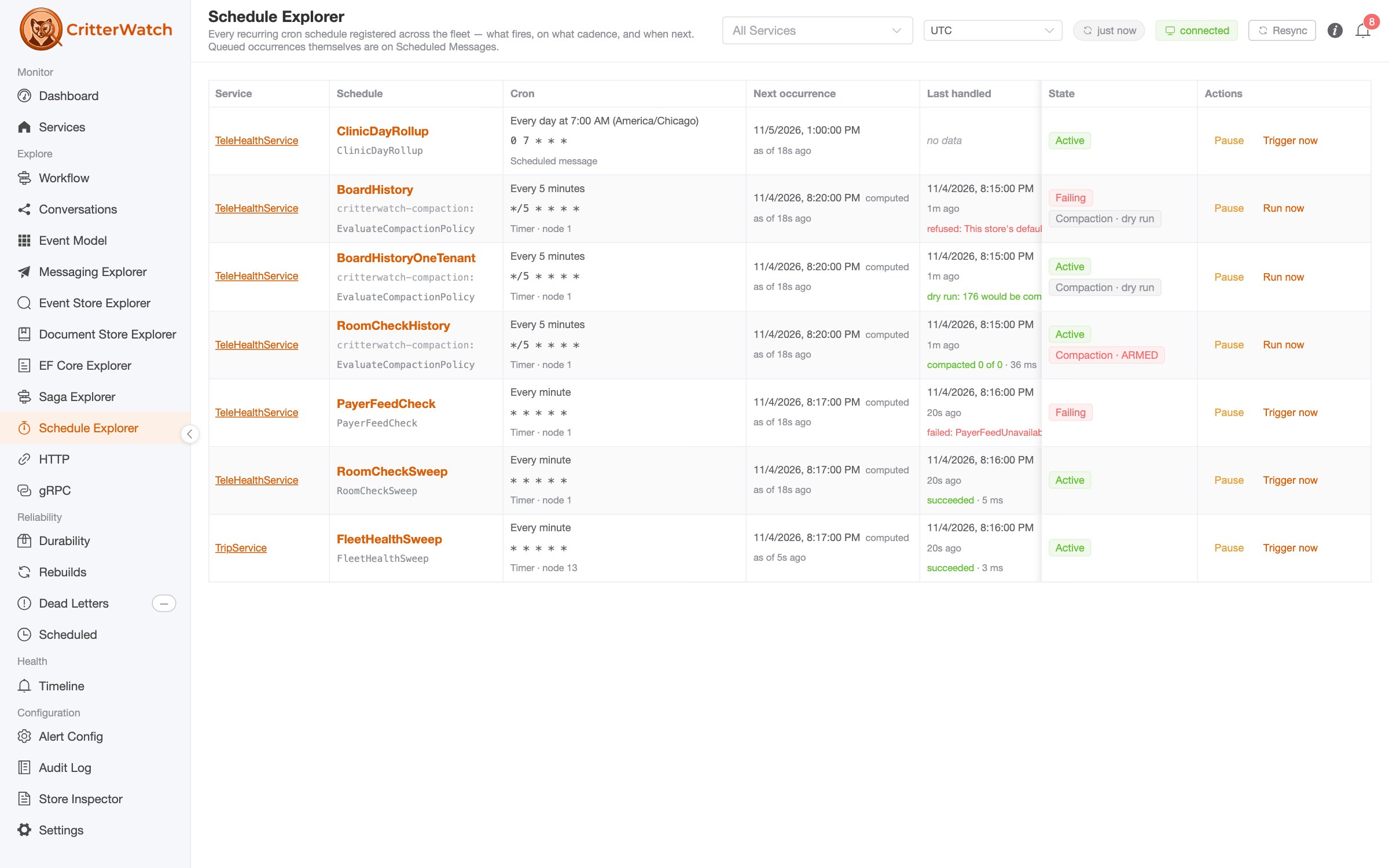
A few things to notice in that grid:
- The Cron column names the execution path.
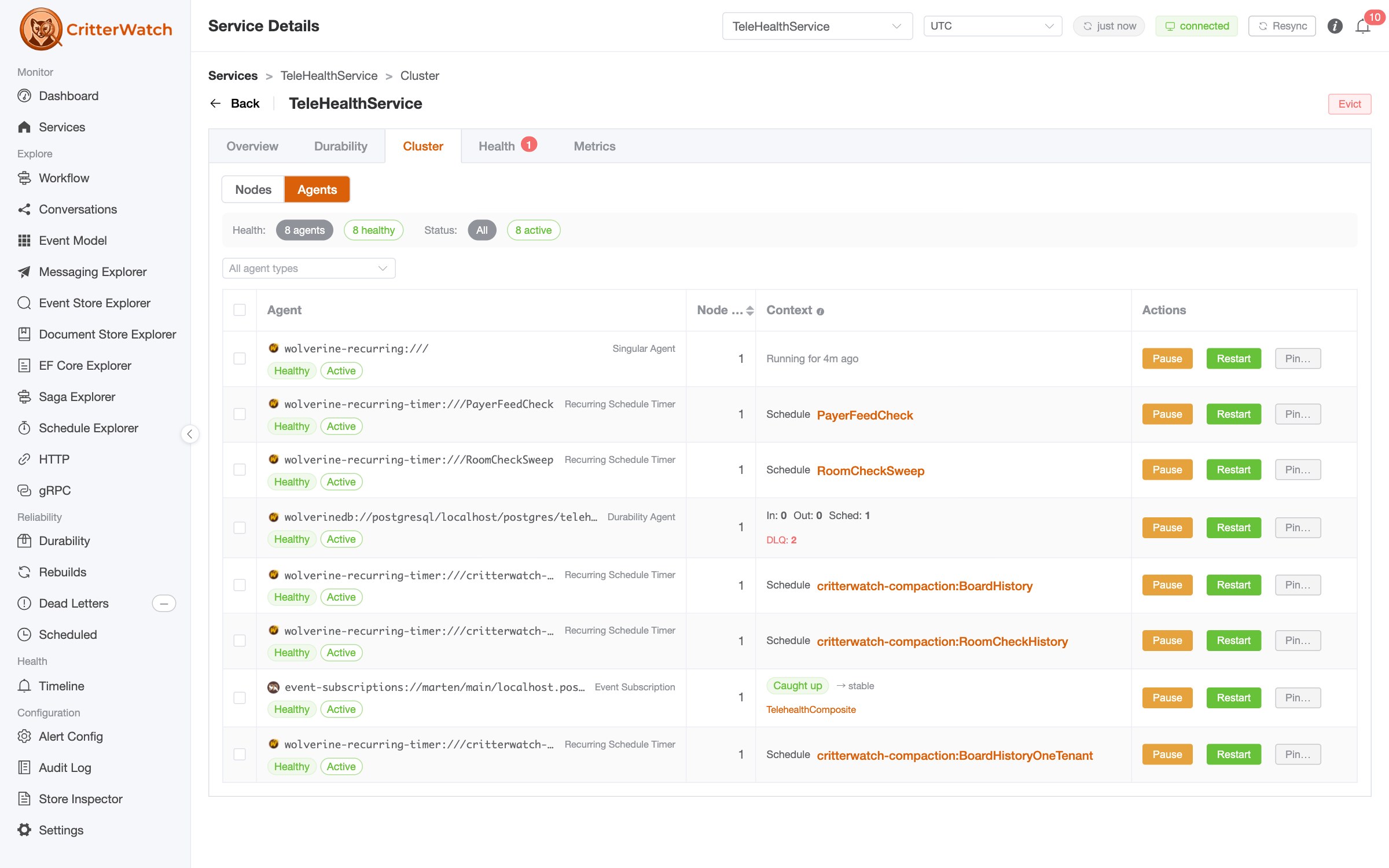
ClinicDayRollupis daily, so it reads Scheduled message. Everything on a one or five minute cadence reads Timer · node 1, which tells you which node is running that schedule's agent. You can see those same agents on the service's Cluster tab further down: one singular agent for the scheduled message path and one timer agent per fast schedule. The computed tag on the next occurrence means it was computed from the cron expression rather than read from a stored row, which is always true on the timer path. - Every cron pattern gets a plain language label, in the schedule's own time zone.
0 7 * * *reads "Every day at 7:00 AM (America/Chicago)." Nobody should have to decode cron fields under pressure. - Last handled is the column that answers "is it still firing?" It's when a monitored node actually ran an occurrence, with whether it succeeded or failed and how long it took.
PayerFeedCheckis a sample handler that fails every other minute on purpose, so you can see whatFailinglooks like: the exception type is right there, and the schedule's page links to its dead letters. - Every runtime reading says when it was true. "as of 18s ago" is a live read of the service's tracking state. A service on an older client would read "announced 6h ago" instead, which means the number is frozen and the console says so rather than letting you trust a stale value. That distinction exists because its absence once cost us a real diagnosis.
- State is
Active,Paused,Failing,Service downorNever fires. That last one is for a schedule registered on a service running in a durability mode that runs no agents, which is a misconfiguration, and showing it as healthy would be the most misleading thing the page could do.
Pause, resume, and trigger now
The actions are the reason a console exists. Pause stops a schedule without a deploy and Resume starts it again, and both are relayed to the owning service, applied to its live agent, and acknowledged back to the console. On the scheduled message path a pause marks the tracking row and cancels the already pre-scheduled next occurrence in one transaction, so nothing fires in the gap. On the timer path a pause is an agent restriction, so the schedule's row and the agent on the service's Agents view show the same state whichever door you used.
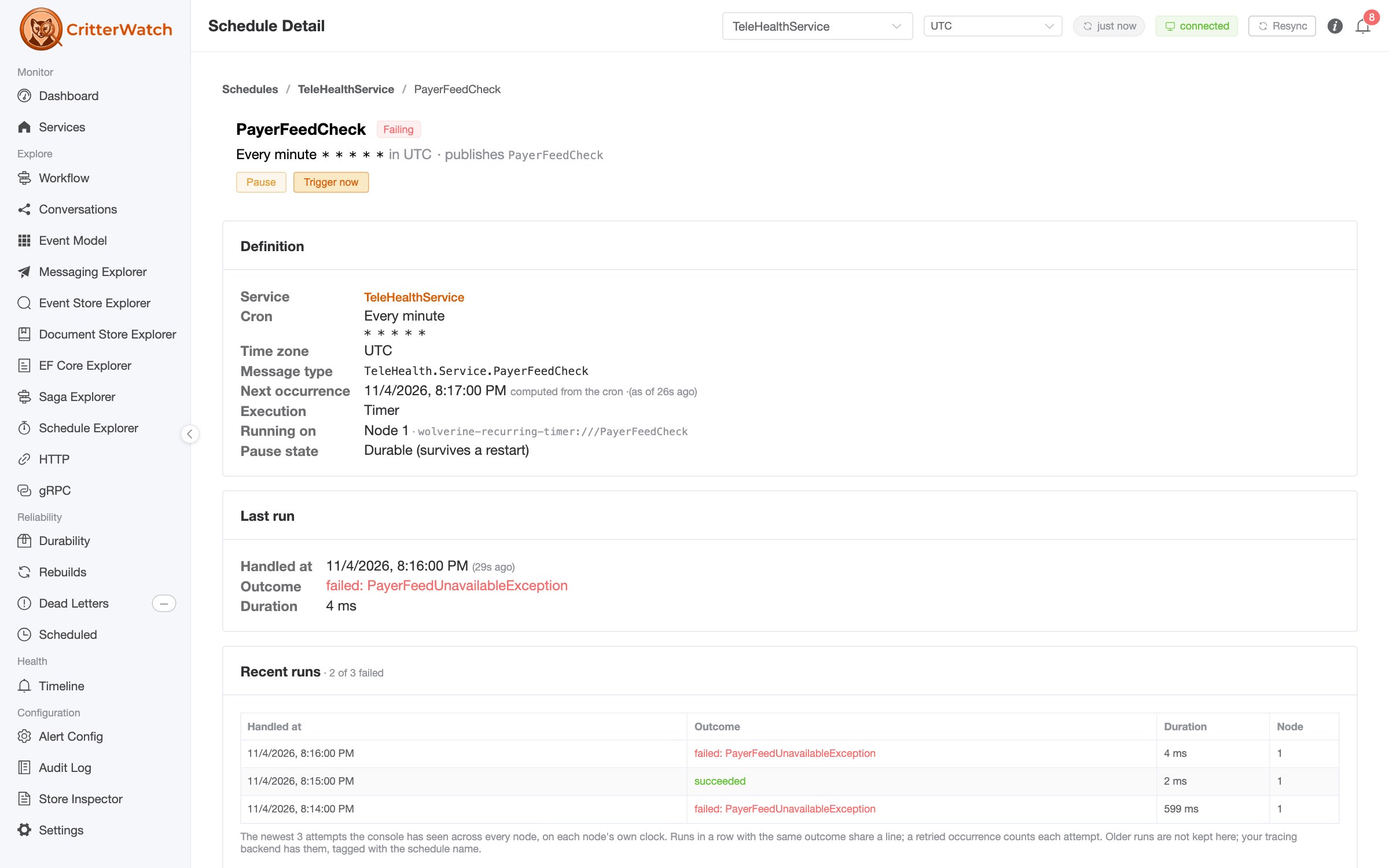
Trigger now runs a schedule once, immediately, without touching its cadence or its pending next occurrence. The manual run gets its own deduplication id so it never collapses into or doubles a scheduled firing. This is also the answer to "I paused it for an hour, now I want to catch up," because resuming never backfills. Resume, then trigger. A paused schedule refuses a trigger on purpose.
Two honest caveats that the console tells you about rather than hiding. On the timer path, trigger publishes immediately from the calling node and two clicks are two runs. On the scheduled message path it runs on the agent's next tick and two requests before that tick coalesce into one. And a pause is only as durable as the service's message store: a service with the recurring tracking table records the pause so it survives a restart, while a service with no message store pauses in agent memory only and the console confirms it with an explicit warning instead of a bare success.
Libraries can register schedules too
One more thing the grid shows: the critterwatch-compaction:* rows are stream compaction policies, which Wolverine.CritterWatch registers as recurring schedules on your behalf:
monitoring.CompactStreams(p =>
{
    p.Name = "RoomCheckHistory";
    p.AggregateType = typeof(RoomCheckLog);
    p.TenantId = RoomCheckSweepHandler.Tenant;
    p.GrowthThreshold = 3;
    p.Cron = "*/5 * * * *";
    p.DryRun = false;
});
Under the covers that's one ScheduleRecurring call per policy with a factory that closes over the policy name, so it gets pause, resume, run history and failure reporting for free, like every other schedule. Because registering the first schedule is also what provisions the wolverine_recurring_messages tracking table, a library adding a schedule means a schema change arriving with a dependency upgrade. Worth knowing, and worth a look at the durable tracking section.
And your AI agent gets the same tools
Everything above is on CritterWatch's MCP server too. list_recurring_schedules returns every schedule with its execution path, owning node, last run outcome and recent run history, and pause_recurring_schedule, resume_recurring_schedule and trigger_recurring_schedule act on them, each gated by its own capability because stopping production work, restoring it, and running it on demand are not equally consequential. Triggering the schedule behind an armed compaction policy answers the first call with a preview and a confirmation token, so an agent has to show you what it's about to delete before it can. The Critter Stack AI Skills teach your agent how to read lastHandledAt and stateAsOf before it concludes anything, which is the same discipline we'd want from a human operator.
What about Quartz.NET?
Some teams already run Quartz and have real investment in its calendars, misfire policies and runtime-editable triggers, and none of that goes away because Wolverine grew a cron scheduler. We're tentatively planning to support Quartz.NET 4 as an alternative execution path for Wolverine recurring schedules in the Wolverine 7.0 release, so that a Quartz-fired occurrence still carries the same schedule headers, deduplication id and span, and still shows up in the Schedule Explorer like every other schedule. Wolverine's built-in scheduler will stay the default. If that integration matters to you, the best thing you can do is tell us about your use case in the Critter Stack Discord before we design it.
Getting it
Recurring schedules are in the core WolverineFx package since 6.34, with the timer path since 6.52 and every-second schedules since 6.61. Nothing changes for a service that registers no schedules. The Schedule Explorer and the MCP tools are in CritterWatch 1.2, with Wolverine.CritterWatch 1.2 in each monitored service. Read-only monitoring needs no license; the pause, resume and trigger actions, the audit log and the MCP server are part of a commercial license, and you can generate a trial license on demand to try all of it.
JasperFx can help
If this post describes a job you've been running on a Task.Delay() loop, or a self-rescheduling message you secretly don't trust, or a Quartz installation that nobody wants to touch, that's exactly the kind of thing JasperFx Software helps teams with. We help teams:
- Move background work onto Wolverine so that scheduled jobs, one-off delayed messages and sagas with timeouts all share one pipeline, one set of resiliency policies and one place to look when something goes wrong.
- Get production visibility with CritterWatch and OpenTelemetry, including the Grafana boards and the alerting that tells you a nightly job didn't run before your customers do.
- Harden a system for scale-out, where "once per cluster" semantics, leader election, blue/green deploys and idempotent handlers stop being theoretical.
- Adopt the Critter Stack as a whole, from an architecture review to a hands-on engagement building the first vertical slices with your team.
That help comes in whatever shape fits. Consulting engagements for a focused push, a support agreement for ongoing access to the people who build these tools, with CritterWatch available as an add-on on every plan, or an interactive workshop tailored to your codebase. Book a consultation or get in touch and tell us what your scheduled work looks like today.