
Part 4 of 4 in the Bobcat series
Most of what I've written about Bobcat so far has been about some of the technical challenges around automated testing: event sourced workflows, flaky integration suites in CI, and Marten's async daemon tests. Today though, let's focus on how to use table driven specifications to clearly describe business logic.
I can't tell you that every attempt I've made over the years to do "executable specifications" on software projects has been a success. One of the most impactful techniques, though, has been to write data intensive business specifications in table form where you can have a business domain expert review the inputs and expected outputs. In one project, we wrote a custom test driver that let you specify banking rules in Markdown tables, then we printed our tests out, and let a business expert mark them up with corrections (don't laugh, I swear that was very helpful!). In the very early days of the FIT testing tool, people talked about trying to allow users to give us Excel sheets that could be used as inputs to test harnesses. And many of us have certainly used parameterized tests in tools like xUnit.net.
In past projects and with tools like Storyteller and FitNesse, my colleagues and I heavily used table based testing to set up data sets for test inputs and used the "set verification" approach to verify expected test results. We also leaned on what I called "decision tables" for business rules that can be expressed as a table of X number of inputs leading to Y number of expected output values.
When we were putting Bobcat together I very much wanted table driven testing back, but without a wiki, a second test runner, or a specification language that isn't C#. Bobcat does all three kinds of table, but the decision table is the one I want to show off in this post.
Let's see what that looks like today in Bobcat.
All the code in this post is a running sample in the LoanUnderwriting folder of the CritterStackSamples repository. Clone it, run dotnet test, and you've got everything you see here.
The business rule
I went looking at what other folks use to teach this kind of testing, and it's remarkably consistent. The FitNesse and FIT material leans on discount and credit calculations, the Cucumber posts love shipping costs, and nearly every decision table tutorial for testers lands on loan approval: credit score, income and debt go in, approve or reject comes out. I'm going with the loan, partially because it's the canonical one and partially because it's a real decision tree where the inputs interact with each other.
Here's our (completely made up) underwriting policy for a personal loan:
- A credit score under 580 is declined. Full stop.
- A debt to income ratio over 43% is declined. Also full stop.
- A loan for more than half of the applicant's annual income gets referred to a human being, unless the applicant has a prime score (740 or better).
- Prime applicants are approved at 6.25%, plus 0.75 if their debt to income is over 36%, plus another 0.50 if it's a large loan.
- Standard applicants (670 to 739) are approved at 7.50%, but referred if their debt to income is over 36%.
- Subprime applicants (580 to 669) are approved at 9.75% with a guarantor, and declined if their debt to income is over 36%.
Four inputs, and three things that come back out: a decision, an interest rate, and whether we need a guarantor. That last bit matters for this post. A rule with one output is easy to test with an [InlineData] theory. A rule where every case has several things to check is where a table starts to earn its keep.
The implementation is one static method:
public record LoanApplication(int CreditScore, decimal DebtToIncome, decimal AnnualIncome, decimal LoanAmount);

public record UnderwritingDecision(Decision Decision, decimal? Rate, bool GuarantorRequired, string Reason);

public static class Underwriting
{
    public static UnderwritingDecision Decide(LoanApplication application)
    {
        // Two knock-out rules come first, and nothing else about the application can save it
        if (application.CreditScore < MinimumCreditScore)
        {
            return Declined($"Credit score is below {MinimumCreditScore}");
        }

        if (application.DebtToIncome > MaximumDebtToIncome)
        {
            return Declined($"Debt to income is above {MaximumDebtToIncome}%");
        }

        var tier = TierFor(application.CreditScore);
        var stretched = application.DebtToIncome > StretchedDebtToIncome;
        var largeLoan = application.LoanAmount > application.AnnualIncome / 2;

        // Only a prime borrower gets a loan bigger than half their income without a person looking at it
        if (largeLoan && tier != CreditTier.Prime)
        {
            return Referred("Loan is more than half of annual income");
        }

        switch (tier)
        {
            case CreditTier.Prime:
                var rate = PrimeRate;
                if (stretched) rate += StretchedSurcharge;
                if (largeLoan) rate += LargeLoanSurcharge;
                return Approved(rate);

            case CreditTier.Standard:
                return stretched
                    ? Referred($"Debt to income is above {StretchedDebtToIncome}%")
                    : Approved(StandardRate);

            default:
                return stretched
                    ? Declined($"Debt to income is above {StretchedDebtToIncome}% for a subprime score")
                    : Approved(SubprimeRate, guarantorRequired: true);
        }
    }
}
It's about forty lines of code and it has <, > and >= comparisons against six different thresholds. That is exactly the kind of code where somebody "tidies up" a comparison operator a year from now and nobody notices until a customer does.
The decision table
Here's the whole specification:
[BobcatFeature("Loan Underwriting")]
public class UnderwritingDecisionTable
{
    [Fact]
    public async Task the_underwriting_rules()
    {
        await TheUnderwritingDecisionsAre("""
            | Credit Score | Debt to Income | Annual Income | Loan Amount | Decision | Rate | Guarantor |
            | 579          | 20             | 90000         | 10000       | Decline  | NULL | false     |
            | 580          | 20             | 90000         | 10000       | Approve  | 9.75 | true      |
            | 640          | 36             | 90000         | 10000       | Approve  | 9.75 | true      |
            | 640          | 37             | 90000         | 10000       | Decline  | NULL | false     |
            | 669          | 30             | 60000         | 30001       | Refer    | NULL | false     |
            | 670          | 30             | 60000         | 30000       | Approve  | 7.50 | false     |
            | 700          | 36             | 60000         | 20000       | Approve  | 7.50 | false     |
            | 700          | 37             | 60000         | 20000       | Refer    | NULL | false     |
            | 700          | 30             | 60000         | 30001       | Refer    | NULL | false     |
            | 739          | 30             | 60000         | 20000       | Approve  | 7.50 | false     |
            | 740          | 30             | 60000         | 20000       | Approve  | 6.25 | false     |
            | 780          | 37             | 60000         | 20000       | Approve  | 7.00 | false     |
            | 780          | 30             | 60000         | 30001       | Approve  | 6.75 | false     |
            | 780          | 43             | 60000         | 45000       | Approve  | 7.50 | false     |
            | 780          | 44             | 60000         | 20000       | Decline  | NULL | false     |
            | 820          | 10             | 250000        | 50000       | Approve  | 6.25 | false     |
            """);
    }

    [Then("the underwriting decisions are")]
    internal async Task TheUnderwritingDecisionsAre(StepTable table)
        => await TableRunner.Run(this, nameof(decide), table);

    // One call per row. The ordinary parameters are the input columns, each out parameter is an
    // output column, and the returned value is checked against the one column nothing else
    // claims, which is Decision.
    private Decision decide(
        [Header("Credit Score")] int creditScore,
        [Header("Debt to Income")] decimal debtToIncome,
        [Header("Annual Income")] decimal annualIncome,
        [Header("Loan Amount")] decimal loanAmount,
        out decimal? rate,
        out bool guarantor)
    {
        var decision = Underwriting.Decide(
            new LoanApplication(creditScore, debtToIncome, annualIncome, loanAmount));

        rate = decision.Rate;
        guarantor = decision.GuarantorRequired;

        return decision.Decision;
    }
}
That's an ordinary xUnit v3 test class. There are three moving parts:
The table is just text. A C# raw string literal with pipes in it. Bobcat's StepTable type reads it through an implicit conversion, so a Markdown table from a GitHub issue, a wiki page, or an email from your product owner pastes in unchanged. I think that's a bigger deal than it sounds like. The table in the requirements, the table in the pull request, and the table in the test can all be the same text.
The step is a method with a [Then] attribute. TheUnderwritingDecisionsAre() is what Bobcat calls a step helper. Bobcat.Generators is a source generator that intercepts the call to it at compile time, and that's how the test run knows there's a step called "the underwriting decisions are" with a table hanging off of it. You don't inherit from anything and there's no registration.
TableRunner.Run() calls a method once per row, and this is where the decision table comes from. The rules for how the row method lines up with the columns are short:
- An ordinary parameter is an input column. It binds by name, case insensitive, or by the
[Header("...")]title if the column heading is prose and the parameter name is code. - An
outparameter is an output column. After the call, its value is compared to that row's cell. - The returned value is compared against the one column that no parameter claimed. Here that's
Decision. - Cells are converted to the parameter's type for you.
Declinebecomes theDecisionenum,NULLis a nulldecimal?, and7.50is adecimal.
So every row in that table makes three assertions, and I never wrote an assertion. The row method only says how to get from the inputs to the outputs.
I do want to point out the rows themselves. Look at 579/580, 669/670, 739/740, 36/37, 43/44 and 30000/30001. A decision table is at its best when the rows walk the boundaries of the tree, because that's where the bugs are. Sixteen rows is nowhere near every combination of four inputs, and it shouldn't be.
What you get when it passes
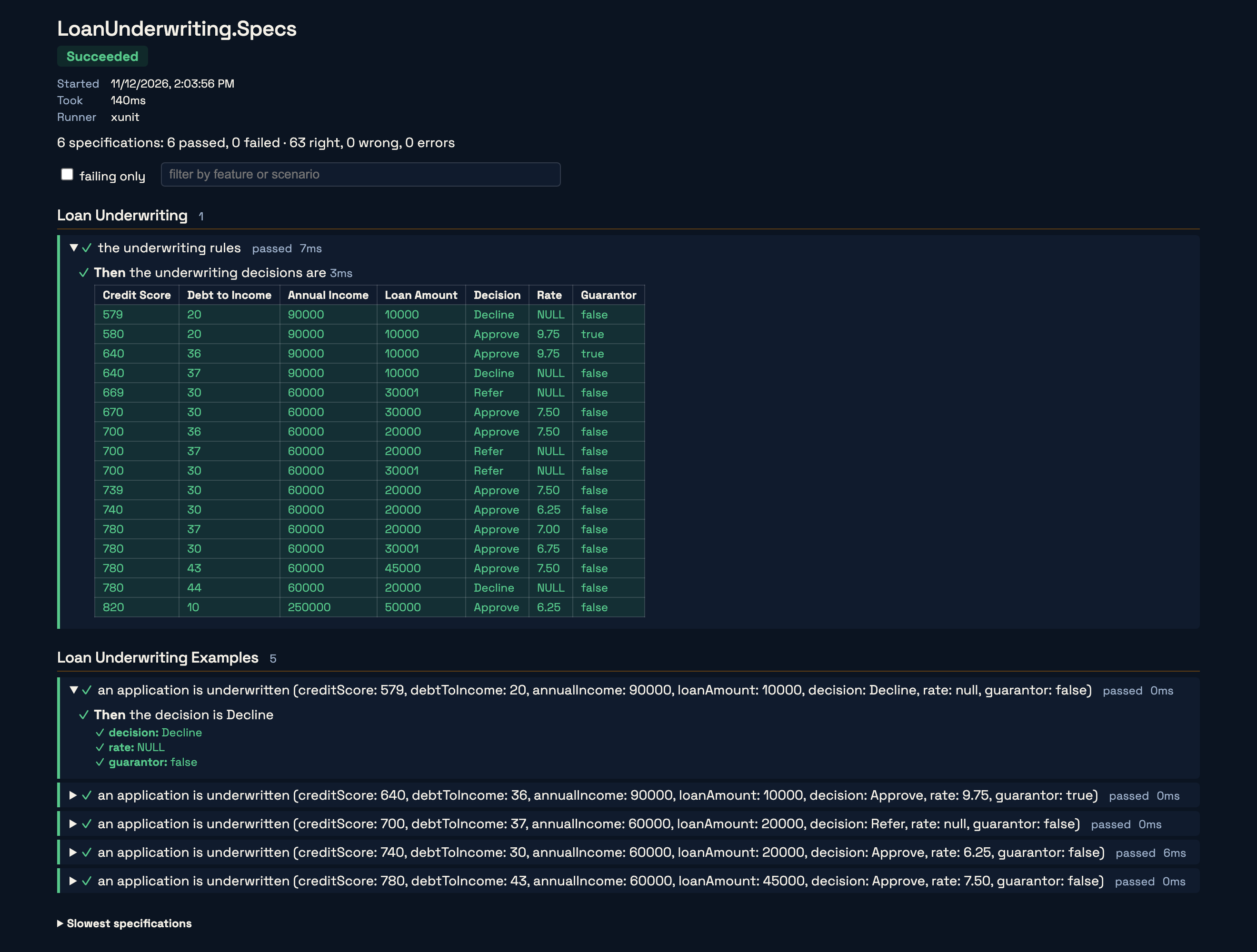
Run it with plain old dotnet test and you get what you'd expect, six passing tests (one for the table, and five more we'll get to in a minute):
dotnet test --project LoanUnderwriting.SpecsTest run summary: Passed!
total: 6
failed: 0
succeeded: 6
skipped: 0
duration: 766msTo see the specification itself, run it through the bobcat command line tool instead. --verbose tells it to print the specifications that passed too. By default it only bothers you with the ones that failed.
dotnet tool install -g Bobcat.Console
bobcat run LoanUnderwriting.Specs --verboseFeature: Loan Underwriting
═══════════════════════════
the underwriting rules OK
────────────────────────────────
✓ Then the underwriting decisions are (3ms)
╭────┬──────────────┬────────────────┬───────────────┬─────────────┬──────────┬──────┬───────────┬─────────╮
│ # │ Credit Score │ Debt to Income │ Annual Income │ Loan Amount │ Decision │ Rate │ Guarantor │ Verdict │
├────┼──────────────┼────────────────┼───────────────┼─────────────┼──────────┼──────┼───────────┼─────────┤
│ 1 │ 579 │ 20 │ 90000 │ 10000 │ Decline │ NULL │ false │ OK │
│ 2 │ 580 │ 20 │ 90000 │ 10000 │ Approve │ 9.75 │ true │ OK │
│ 3 │ 640 │ 36 │ 90000 │ 10000 │ Approve │ 9.75 │ true │ OK │
│ 4 │ 640 │ 37 │ 90000 │ 10000 │ Decline │ NULL │ false │ OK │
│ 5 │ 669 │ 30 │ 60000 │ 30001 │ Refer │ NULL │ false │ OK │
│ 6 │ 670 │ 30 │ 60000 │ 30000 │ Approve │ 7.50 │ false │ OK │
│ 7 │ 700 │ 36 │ 60000 │ 20000 │ Approve │ 7.50 │ false │ OK │
│ 8 │ 700 │ 37 │ 60000 │ 20000 │ Refer │ NULL │ false │ OK │
│ 9 │ 700 │ 30 │ 60000 │ 30001 │ Refer │ NULL │ false │ OK │
│ 10 │ 739 │ 30 │ 60000 │ 20000 │ Approve │ 7.50 │ false │ OK │
│ 11 │ 740 │ 30 │ 60000 │ 20000 │ Approve │ 6.25 │ false │ OK │
│ 12 │ 780 │ 37 │ 60000 │ 20000 │ Approve │ 7.00 │ false │ OK │
│ 13 │ 780 │ 30 │ 60000 │ 30001 │ Approve │ 6.75 │ false │ OK │
│ 14 │ 780 │ 43 │ 60000 │ 45000 │ Approve │ 7.50 │ false │ OK │
│ 15 │ 780 │ 44 │ 60000 │ 20000 │ Decline │ NULL │ false │ OK │
│ 16 │ 820 │ 10 │ 250000 │ 50000 │ Approve │ 6.25 │ false │ OK │
╰────┴──────────────┴────────────────┴───────────────┴─────────────┴──────────┴──────┴───────────┴─────────╯
Succeeded with Rights: 48, Wrongs: 0, Errors: 0"Rights: 48" is sixteen rows times three outputs. Every output cell got its own verdict.
If you'd rather have something you can hand to a person, bobcat run LoanUnderwriting.Specs --html results.html writes the same run as one self-contained HTML page:
What you get when it fails
Now let's play the well meaning developer from a year in the future. I'm going to change one character in Decide():
// was: application.DebtToIncome > StretchedDebtToIncome
var stretched = application.DebtToIncome >= StretchedDebtToIncome;
An applicant at exactly 36% debt to income is now "stretched" when the policy says they shouldn't be. Here's the run:
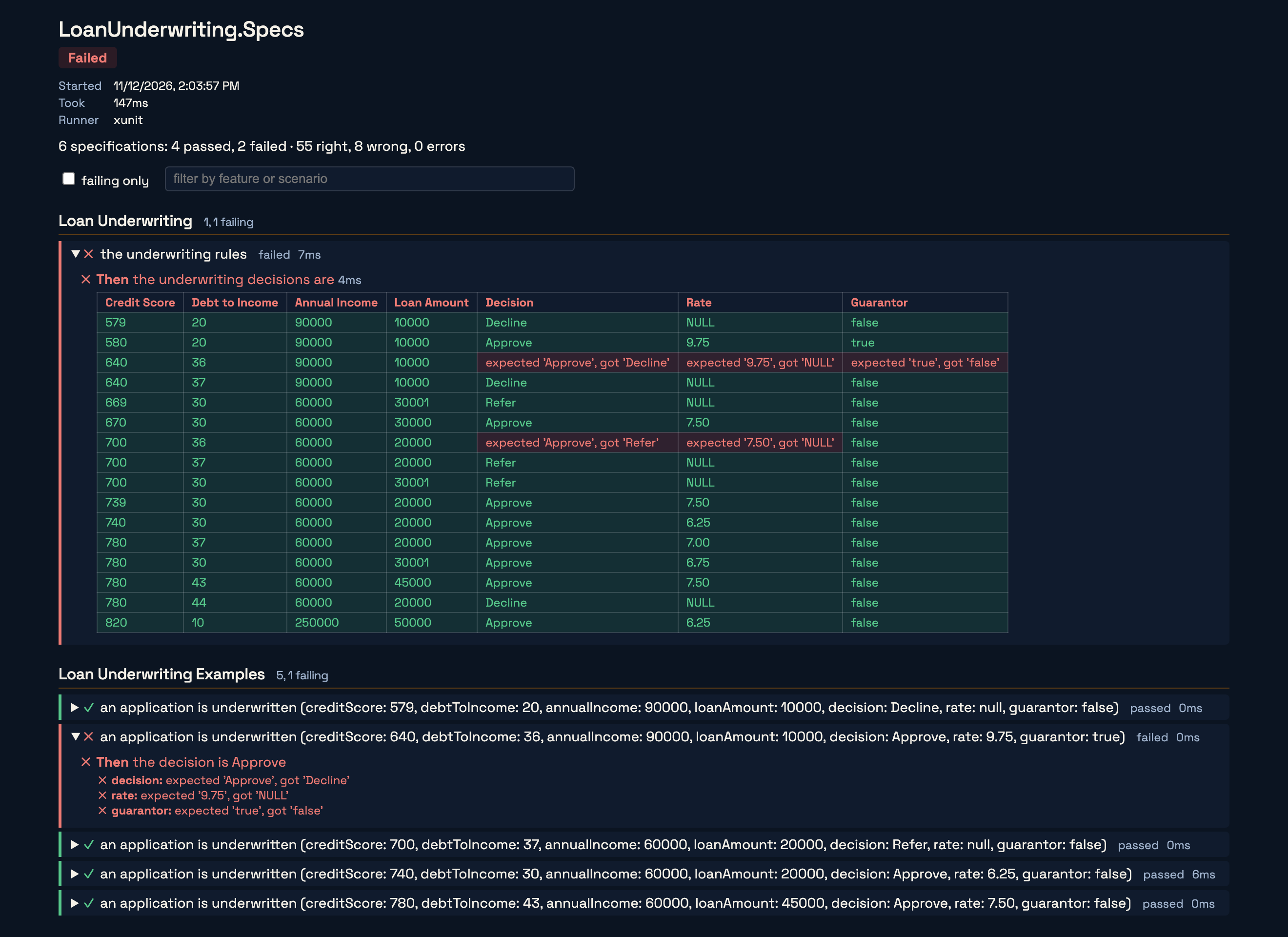
And the same thing at the console, which is also what lands in the test output of dotnet test, your IDE, and your CI log:
  the underwriting rules FAILED
  ────────────────────────────────
    ✗ Then  the underwriting decisions are (3ms)
╭────┬──────────────┬────────────────┬───────────────┬─────────────┬───────────────────────────────────┬─────────────────────────────┬──────────────────────────────┬─────────╮
│ #  │ Credit Score │ Debt to Income │ Annual Income │ Loan Amount │ Decision                          │ Rate                        │ Guarantor                    │ Verdict │
├────┼──────────────┼────────────────┼───────────────┼─────────────┼───────────────────────────────────┼─────────────────────────────┼──────────────────────────────┼─────────┤
│ 1  │ 579          │ 20             │ 90000         │ 10000       │ Decline                           │ NULL                        │ false                        │   OK    │
│ 2  │ 580          │ 20             │ 90000         │ 10000       │ Approve                           │ 9.75                        │ true                         │   OK    │
│ 3  │ 640          │ 36             │ 90000         │ 10000       │ expected 'Approve', got 'Decline' │ expected '9.75', got 'NULL' │ expected 'true', got 'false' │  FAIL   │
│ 4  │ 640          │ 37             │ 90000         │ 10000       │ Decline                           │ NULL                        │ false                        │   OK    │
│ 5  │ 669          │ 30             │ 60000         │ 30001       │ Refer                             │ NULL                        │ false                        │   OK    │
│ 6  │ 670          │ 30             │ 60000         │ 30000       │ Approve                           │ 7.50                        │ false                        │   OK    │
│ 7  │ 700          │ 36             │ 60000         │ 20000       │ expected 'Approve', got 'Refer'   │ expected '7.50', got 'NULL' │ false                        │  FAIL   │
│ 8  │ 700          │ 37             │ 60000         │ 20000       │ Refer                             │ NULL                        │ false                        │   OK    │
│ 9  │ 700          │ 30             │ 60000         │ 30001       │ Refer                             │ NULL                        │ false                        │   OK    │
│ 10 │ 739          │ 30             │ 60000         │ 20000       │ Approve                           │ 7.50                        │ false                        │   OK    │
│ 11 │ 740          │ 30             │ 60000         │ 20000       │ Approve                           │ 6.25                        │ false                        │   OK    │
│ 12 │ 780          │ 37             │ 60000         │ 20000       │ Approve                           │ 7.00                        │ false                        │   OK    │
│ 13 │ 780          │ 30             │ 60000         │ 30001       │ Approve                           │ 6.75                        │ false                        │   OK    │
│ 14 │ 780          │ 43             │ 60000         │ 45000       │ Approve                           │ 7.50                        │ false                        │   OK    │
│ 15 │ 780          │ 44             │ 60000         │ 20000       │ Decline                           │ NULL                        │ false                        │   OK    │
│ 16 │ 820          │ 10             │ 250000        │ 50000       │ Approve                           │ 6.25                        │ false                        │   OK    │
╰────┴──────────────┴────────────────┴───────────────┴─────────────┴───────────────────────────────────┴─────────────────────────────┴──────────────────────────────┴─────────╯

  Failed with Rights: 43, Wrongs: 5, Errors: 0
A few things I'd like you to notice, because they're all on purpose:
- The table kept going. A typical assertion library throws on the first mismatch and you find out about the second one after you've fixed the first. Bobcat gathers the wrongs. Row 3 failing didn't stop row 7 from running, and the test fails once at the end with everything it found.
- Every output is judged on its own. Row 3 has three red cells. Row 7 has two red cells and a green one, because the guarantor answer happened to still be right. You can see what the system actually did, and not only that the row didn't match.
- The pattern tells you where the bug is. Two rows failed, and they're the only two rows in the table with a debt to income of exactly 36. I didn't need a debugger for that one, and more to the point, neither would an AI agent that got handed this output and asked to fix it.
That third point is why I care about this so much. A failing [Theory] gives you one red test and the arguments it was called with. A failing decision table gives you the neighbors, the rows right next to it that still pass, and that's usually most of the diagnosis.
Or make every row its own test
One specification for the whole table is how I'd write this rule, because the sixteen rows together are the claim. But sometimes each row really is its own example. You want to see it in the IDE's test tree, rerun just that one, or track its history on its own. That's the Cucumber Scenario Outline way of thinking about it, and Bobcat does that too by putting the table on an xUnit theory:
[BobcatFeature("Loan Underwriting Examples")]
public class UnderwritingExamples
{
    [BobcatTheory]
    [BobcatExamples("""
        | creditScore | debtToIncome | annualIncome | loanAmount | decision | rate | guarantor |
        | 579         | 20           | 90000        | 10000      | Decline  | NULL | false     |
        | 640         | 36           | 90000        | 10000      | Approve  | 9.75 | true      |
        | 700         | 37           | 60000        | 20000      | Refer    | NULL | false     |
        | 740         | 30           | 60000        | 20000      | Approve  | 6.25 | false     |
        | 780         | 43           | 60000        | 45000      | Approve  | 7.50 | false     |
        """)]
    public void an_application_is_underwritten(
        int creditScore, decimal debtToIncome, decimal annualIncome, decimal loanAmount,
        Decision decision, decimal? rate, bool guarantor)
    {
        var actual = Underwriting.Decide(
            new LoanApplication(creditScore, debtToIncome, annualIncome, loanAmount));

        TheDecisionIs(actual, decision, rate, guarantor);
    }

    [Then("the decision is {decision}")]
    internal void TheDecisionIs(UnderwritingDecision actual, Decision decision, decimal? rate, bool guarantor)
    {
        // SpecAssert gathers: all three are checked and reported even when the first is wrong
        SpecAssert.Check("decision", actual.Decision, decision);
        SpecAssert.Check("rate", actual.Rate, rate);
        SpecAssert.Check("guarantor", actual.GuarantorRequired, guarantor);
    }
}
[BobcatTheory] is an xUnit [Theory], and [BobcatExamples] is its data. Each row turns into its own test case with its own name, so xUnit, your IDE, and your CI report all see five tests. With the same one character bug in place, exactly one of them fails:
  an application is underwritten (creditScore: 640, debtToIncome: 36, annualIncome: 90000, loanAmount: 10000, decision: Approve, rate: 9.75, guarantor: true) FAILED
  ────────────────────────────────────────────────────────────
    ✗ Then  the decision is expected 'Approve', got 'Decline'
        ✗ rate: expected '9.75', got 'NULL'
        ✗ guarantor: expected 'true', got 'false'

  Failed with Rights: 0, Wrongs: 3, Errors: 0
There's one more thing this version buys you. The table is a compile time constant sitting in an attribute, so the Bobcat generator checks it when you build. Rename the rate parameter and forget the column, misspell Aprove, or leave a cell off of a row, and you get a compiler diagnostic pointing at the table instead of a confusing failure at test discovery.
So which one? My rule of thumb:
One table, one spec (TableRunner) | One spec per row ([BobcatExamples]) | |
|---|---|---|
| Reads as | one rule, stated completely | a list of separate examples |
| On failure | one red test, a grid showing every wrong cell beside the rows that passed | one red test per wrong row |
| Outputs | out parameters and the return value, no assertions to write | whatever assertions you write in the body |
| When the table is checked | at run time, where a bad cell fails only its own row | at build time: column names, row shapes, and cell values |
| Reach for it when | the rows are only meaningful together, like the boundaries of a decision tree | each row is a case somebody wants to run or track by itself |
They're not mutually exclusive either. The sample has both, pointed at the same function.
Reviewing the specification
Here's a design decision that I want to be upfront about. FIT, FitNesse, Storyteller, and Gherkin all chased the idea that a non-technical domain expert would author the executable specifications. I chased it myself for years. With Bobcat we're making a conscious decision to go the other way this time: make the specifications technically easy for developers and test automation engineers to write, in the language and the tooling they already use every day, and put our effort into making what they wrote easy for everybody else to read. That may change in the future, but that's where we are today.
So the domain expert doesn't write the table. They review it with you. And you'd rather not do that by scrolling through C# in a pull request, so Bobcat will show you the specifications as specifications without running anything:
bobcat preview LoanUnderwriting.SpecsFeature: Loan Underwriting
═══════════════════════════
the underwriting rules
────────────────────────────────
○ Then the underwriting decisions are
↳ UnderwritingDecisionTable.TheUnderwritingDecisionsAre
Feature: Loan Underwriting Examples
════════════════════════════════════
an application is underwritten
────────────────────────────────────────
○ Then the decision is {decision}
↳ UnderwritingExamples.TheDecisionIs
2 specification(s) previewedThe Bobcat UI has the same view in the browser, which is the one I'd actually put up on a shared screen. Every feature, every specification, the steps each one declares, and every example row, before a single test has run:
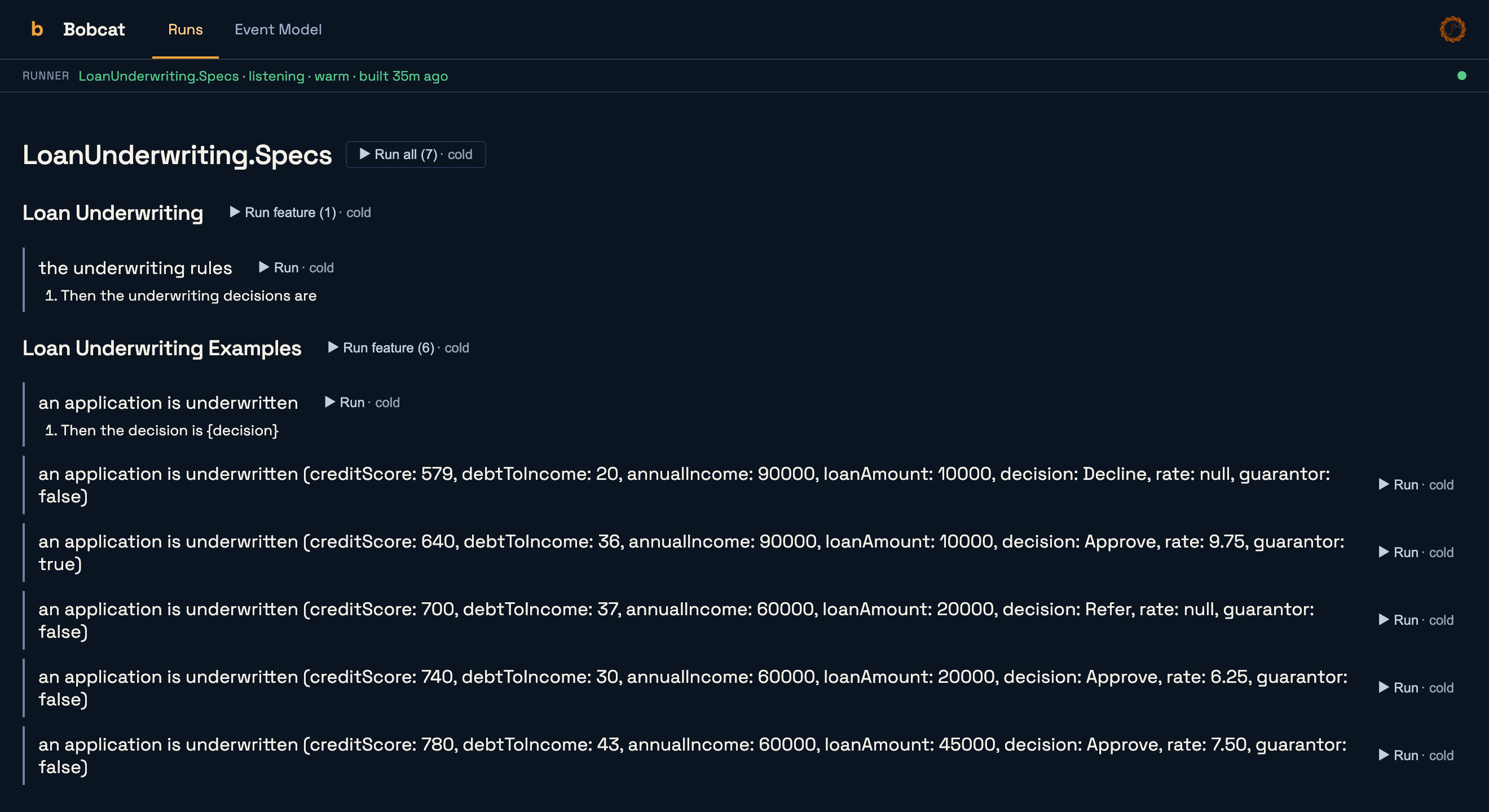
I do have to be honest about a gap. The preview shows you the step for our big decision table, but not yet the sixteen rows inside of it, and for a table driven specification the rows are the whole point. That's on our list. The [BobcatExamples] rows do show up, one specification apiece.
Until then, the thing I'd hand to a domain expert is the results page from the last section. bobcat run --html gives you one self-contained file with the full grid in it, and it needs no tooling on their end to open. It also happens to answer their next question, which is always "and does it actually do that?"
It doesn't have to be a pure function
I kept the system under test as boring as I could because I wanted this post to be about the table. But nothing about TableRunner cares what the row method does. It can be async, it can send a command through Wolverine, and it can read a projected document back out of Marten. The same mechanics also do bulk setup, set verification, and checking one object against a row.
That said, if your business rule can be a pure function, please let it be one. Our consistent advice for the Critter Stack is to push the decision making into pure functions and let Wolverine and Marten deal with the infrastructure around them, and this is the payoff. Sixteen cases of a real business policy run in three milliseconds, with no Docker anywhere in sight. Prove the rule down here where it's cheap, and save the integration tests for proving that the rule is actually wired up.
Try it
- The sample: CritterStackSamples/LoanUnderwriting. It needs the .NET 10 SDK and nothing else. The README walks through breaking it on purpose so you can see the red run for yourself.
- The Bobcat tutorial on Data Intensive Specifications, including decision tables with out parameters and
[BobcatExamples]. - Introducing Bobcat if this is the first you're hearing of it.
And as always, come find us in the Critter Stack Discord if you've got questions, or if you've got a gnarly table driven test you'd like to see Bobcat handle.